- Open Tasks->Manage encapsulated assertions
- delete all assertions starting with the Prefix you want to delete e.g. mag
- now delete the folder for your prefix e.g. MAG-2.2.01 mag
- you will receive some errors for still referenced policies, fragements and folders. Press OK for all
- Delete the folder again.
- Finished.
Showing posts with label Layer 7. Show all posts
Showing posts with label Layer 7. Show all posts
Thursday, 12 March 2015
Delete MAG Kit from CA API Gateway
I recently had to delete the MAG kit after some tests and ran into relationships between the installed fragments, encapsulated assertions and policies using them. Here is the simple solution for removing an installed MAG kit.

Tuesday, 4 November 2014
First steps with CA API Gateway New Restman interface
The new version of the CA API Gateway, formerly known as CA Layer 7 Gateway or SecureSpan Gateway, brought a new Management Interface. The new Restman Interface is a REST-API with Comprehensive online API documentation.
To install or activate the API do the following :

To install or activate the API do the following :
- Select [Tasks] > Publish Internal Service from the main menu
 |
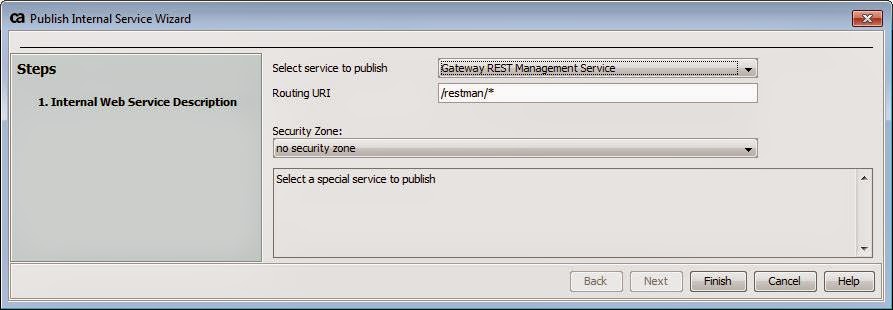
The Publish Internal Service Wizard appears.
|
- Choose Gateway REST Management Service from the drop-down list as the service to publish.
- Optionally, change the Routing URI if necessary. Note: The routing URI must always end with “/*”.
- Click [Finish] to publish the internal service. This creates a new service in the root folder named “Gateway REST Management Service”. The REST API is now installed.
Subscribe to:
Posts (Atom)