Showing posts with label Gateway. Show all posts

Wednesday, 6 April 2016

CA API gateway uses SAML with onelogin.com

Some time ago I wrote a blog entry for CA's API community side. Today I want move this a little bit by linking it to my own side.

The CA API Gateway can be configured to act as Service provider (SP), Identity Provider (IdP) or both. In this sample the Gateway is used as SP and the IdaaS platform onelogin.com is used as IdP. The communication is configured to use SAML 2.0. The sample are developed by Ben_Urbanski I think, see attached XML files.


First of all I set up the to service for SP and Idp in the gateway to work as designed.


  1. Create a "Publish Web API" as SP with custom resolution path as "/saml2/websso/serviceprovider"
  2. Import the policy SAML SSO ServiceProvider.xml into the above service.
  3. Create a "Publish Web API" as IdP with custom resolution path as "/saml2/websso/identityprovider"
  4. Import the policy SAML SSO IdentityProvider.xml into the above service.
  5. Check it is working with the URL "http://explore.apim.ca:8080//saml2/websso/serviceprovider" in your browser
  6. You should be redirected to a login page on the gateway.

For more details, please see the original post on Post in CA API Forum

Tuesday, 4 November 2014

First steps with CA API Gateway New Restman interface

The new version of the CA API Gateway, formerly known as CA Layer 7 Gateway or SecureSpan Gateway, brought a new Management Interface. The new Restman Interface is a REST-API with Comprehensive online API documentation.

To install or activate the API do the following :

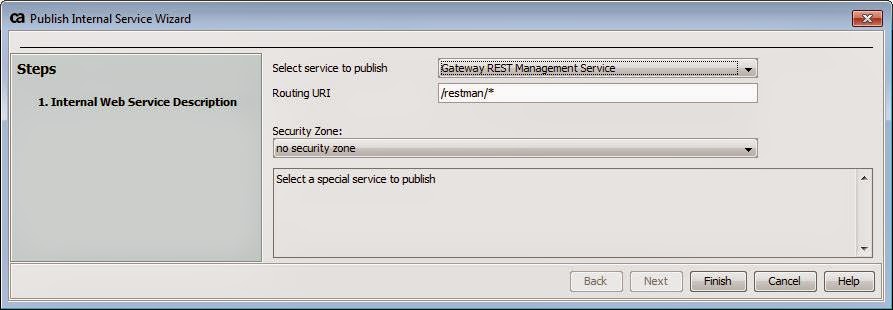
  •  Select [Tasks] > Publish Internal Service from the main menu 

The Publish Internal Service Wizard appears.


  • Choose Gateway REST Management Service from the drop-down list as the service to publish.
  • Optionally, change the Routing URI if necessary. Note: The routing URI must always end with “/*”.


  •  Click [Finish] to publish the internal service. This creates a new service in the root folder named “Gateway REST Management Service”. The REST API is now installed.